
How to Use the INFOSTOP AS60M Touchscreen Controls
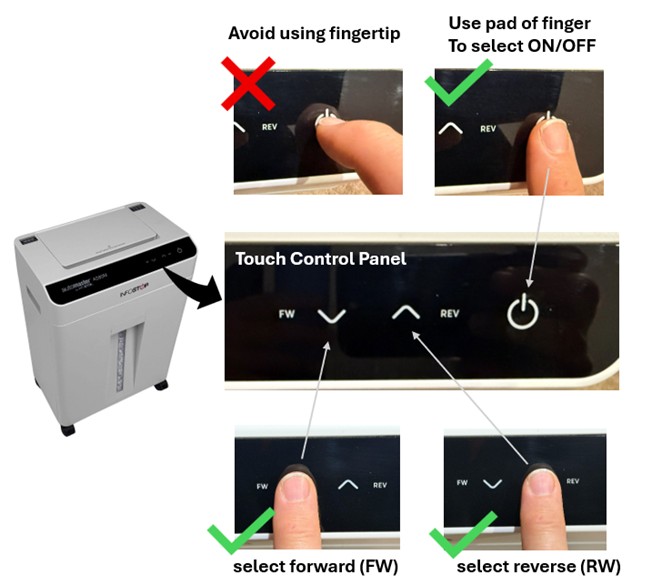
The INFOSTOP Automaster AS60M paper shredder features an intuitive touchscreen control panel that allows you to manage functions such as power ON/OFF and blade direction—forward (FW) or reverse (RW). For best results, operate the panel by pressing the centre of each button with the flat pad of your finger. Avoid using your fingertip, as its smaller contact area may not reliably register your selection.
To learn more about the INFOSTOP Automaster AS60M, visit the Shredder Sales website.
Do You Need Advice? For assistance, Contact Shredder Sales by Live Chat or:
Phone: 1800 808 880
Email: info@shreddersales.com.au
May 6, 2026
Top 10 Auto Feed Paper Shredder Picks for 2025.
February 16, 2025
Best Paper Shredder for Working From Home
August 17, 2020
Choosing Between an Auto Feed and Manual Feed Paper Shredder
October 30, 2019
How Often Should Oil Sheets Be Used On A Paper Shredder
March 15, 2024
INFOSTOP Automaster Reinvents Tradition
August 29, 2026